Clinic Software
Summary: Retail clinic software options to investigate include Yosi Health for scheduling and intake, MacPractice for practice management and electronic health records, and PhysLab as a laboratory-workflow candidate whose current capabilities need confirmation. Choose based on the bottleneck: front-desk intake, clinical documentation and administration, or lab workflows. These products address different tasks and should be tested against the clinic’s existing visit handoffs.
A walk-in patient reaches the front desk before the intake form loads. The receptionist asks for the insurance card that online booking already collected. The visit starts with rework, the queue backs up, and the clinician loses the clean handoff a retail clinic needs. A broad feature list will not tell you which step is causing that delay.
Retail clinic software should be chosen by the operational failure it fixes first: intake, charting and practice management, or lab ordering. A retail clinic should not buy a broad healthcare software suite by default when a narrower product may fit the point where visits slow down. Start with the repeated task, then check whether the product fits the rest of the visit.
The candidates below are discussed against different parts of a clinic's workflow, not as interchangeable or equally verified products. The practical choice is the smallest system that removes the most repeated work, provided it fits the existing handoffs. That means testing each option against a real visit path rather than a vendor's general feature tour.
Comparison basis: This is a workflow-based shortlist, not a hands-on product ranking. Vendor descriptions are starting points for questions, not proof of compatibility, performance or clinical suitability. No product should be treated as a tested winner on the strength of this article. Confirm current capabilities, contracts and interfaces directly during evaluation; the PhysLab discussion below is a set of questions to investigate, not a verified feature endorsement. The opening front-desk scenario is illustrative rather than a reported patient case.
1. Yosi Health: evaluating urgent care intake
Yosi Health urgent care software presents an intake-focused option for urgent care centers. Evaluate its scheduling and intake workflow against the information your team needs before the provider handoff. Yosi Health fits a clinic where the front desk spends time collecting or repairing information before a clinician can begin. Its stated focus is scheduling and intake, so a team should assess it as an access and front-desk option, not assume it replaces the clinical record system.
A clinic evaluating Yosi Health should trace the information collected before the visit reaches the desk. The demo can follow one patient from scheduling through intake, including the questions staff need answered before the clinician takes over. If the clinic's actual difficulty is charting or managing claims after the visit, an intake-focused product may leave that core problem untouched.
The important distinction is between collecting information and keeping the clinical record. A team can ask whether the intake process covers its own forms and handoff, then separately establish where staff will review and document the visit. That separation matters when a clinic is considering patient communication software alongside an existing EHR, rather than replacing the EHR itself.
Walk-in and scheduled visits create different tests for the same intake workflow. For a scheduled visit, the team can check whether information submitted in advance is available when the patient arrives. For a walk-in, the team can see what staff must enter at the desk and whether the intake sequence supports the clinic's actual process. The demo should reveal which of those paths Yosi Health addresses, rather than relying on a sample that avoids the clinic's busiest handoff.
Yosi Health is worth evaluating here when urgent care intake is the named bottleneck. Before shortlisting it, write down the fields patients complete, the details staff verify, and the information clinicians need at handoff; the resulting test will show whether the product addresses the front-door problem or whether the clinic needs a broader system.
2. MacPractice: evaluating practice management and EHR
MacPractice medical software describes practice management and electronic health record software. An electronic health record (EHR) is the clinical record component discussed here; EMR refers to an electronic medical record. MacPractice suits a clinic that wants the administrative and clinical record system considered together. That scope makes it a different purchase from a stand-alone intake tool or a laboratory ordering system.
A retail clinic should evaluate MacPractice when administrative work and clinical documentation are both part of the system decision. The buying team can map who handles appointment information, who documents the visit, and who completes the administrative work afterward. Then it can ask the vendor to demonstrate those handoffs in sequence, rather than treating "practice management" and "EHR" as labels that explain how the clinic's own tasks will work.
A useful demo follows one visit from its opening record through provider documentation and the next administrative step. The clinic should use its own ordinary workflow as the test case, including the points where one staff member passes information to another. If the demo covers only the clinician's screen, it will not show how the practice-management part fits the rest of the work.
A broader system can involve more roles in the buying decision than a narrowly focused intake product. That is a trade-off, not an automatic drawback: a clinic seeking healthcare emr systems needs to assess how those responsibilities fit together, while a clinic with those functions already covered may not need to revisit them. The team should identify which roles must take part in testing before deciding that the product's scope matches its needs.
MacPractice belongs on the shortlist when the administrative and clinical record system is the problem to solve. If a team is looking for an urgent care EHR, it should still spell out which work the EHR must cover and which parts will remain in other tools; otherwise, a broad product description can obscure a mismatch in the day-to-day workflow.
3. PhysLab: questions about web-based lab orders and results
Evaluate PhysLab only after confirming its current ordering and results capabilities with an identifiable product source. This article does not establish those capabilities or its compatibility with a clinic's existing record system. For a team whose scheduling and charting are already handled, the evaluation question is whether a separate laboratory workflow needs attention—not whether a laboratory label proves that this candidate fits.
A clinic considering PhysLab should follow one lab order through the steps its staff actually perform: the provider requests the test, the order is placed, the result becomes available, and the appropriate person reviews it. The team can note where it currently re-enters information or needs to move between systems, then check whether the web-based workflow addresses those points. That test is more useful than a general question about whether the product supports laboratory work.
The fit depends on how lab ordering connects to the clinic's existing record and review process. A team should ask which part of the workflow PhysLab covers and how staff will handle the remaining steps. Ask the vendor to demonstrate whether web-based ordering and results are available, which laboratory relationships they cover, and how a specific clinic's EHR or internal review process would connect to them. That connection needs to be tested directly rather than assumed from the product category.
Do not treat PhysLab as a substitute for an intake or practice-management decision simply because laboratory work occurs during a visit. A clinic investigating lab ordering and results should request a current product demonstration before placing it on an evidence-backed shortlist, then establish whether its actual provider review process could use the proposed workflow. If the clinic's main delay happens before the order is placed, the first software test should address that earlier step instead.
How to choose the right retail clinic software
Start by locating the step where staff repeat, chase, or correct information that someone else already supplied. Retail clinic workflows vary. The linked Tampa Bay Business and Wealth report on outpatient healthcare concerns demand for outpatient care. Use that regional context as background, not as evidence that a particular clinic needs a particular product. The clinic still needs to identify its own visit types, staff responsibilities and software requirements before drawing up a shortlist.
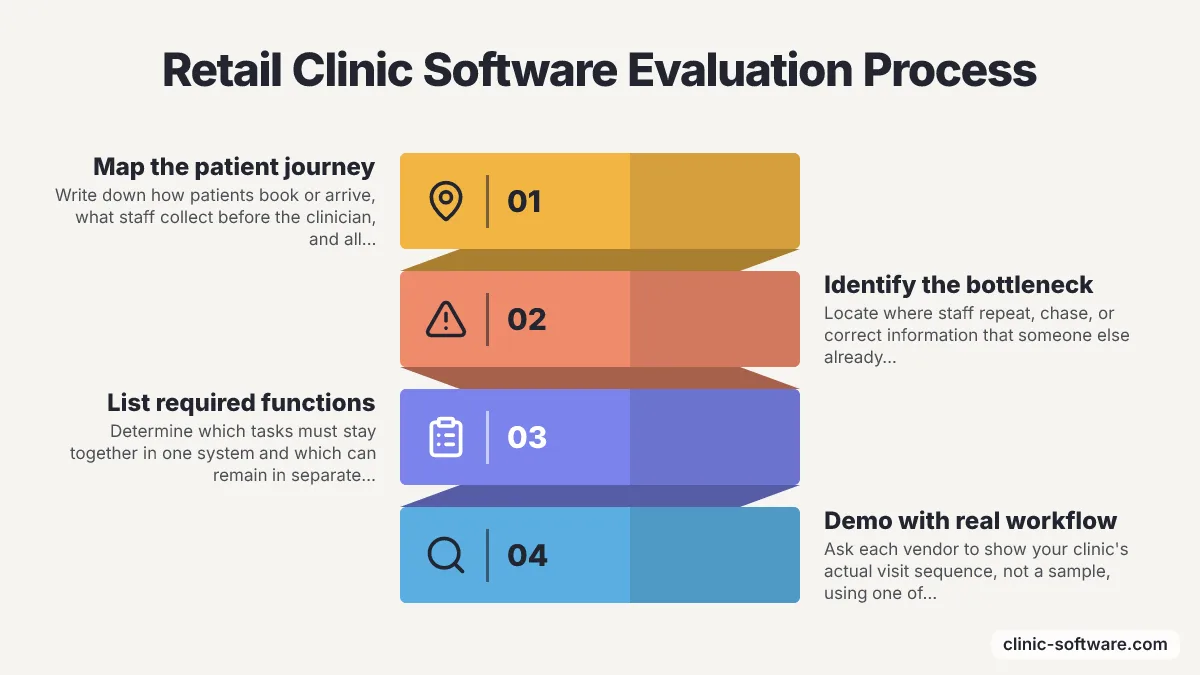
A walk-in clinic may need to handle a different mix of tasks from a clinic focused on scheduled appointments. The linked North Las Vegas MinuteClinic services page identifies a clinic location; it is not evidence that a software product supports a particular service. For evaluation, list the visit types your own clinic actually provides and ask how the proposed system handles their different registration, documentation and follow-up requirements. Do not infer current services or software capabilities from a location listing.
Use one ordinary visit to compare products, and keep the sequence consistent:
- Write down how a patient books or arrives without an appointment, then identify what staff collect before the clinician sees the patient.
- Mark where the provider documents the visit and whether the same system needs to handle administrative work.
- If laboratory work is part of the visit, follow an order through result review and note every separate handoff.
- Ask each vendor to show the relevant steps using the clinic's workflow, then record which tasks the product covers and which remain elsewhere.
How do the candidates differ in scope?
Compare intake, clinical record management and laboratory workflows separately instead of treating the candidates as interchangeable. Yosi Health's stated focus is scheduling and intake, while MacPractice describes practice management and EHR software. Treat web-based lab ordering and results as capabilities to verify for PhysLab rather than established facts about the product. A clinic can use those descriptions to form an initial shortlist, but the supplied information does not establish how any product integrates with a particular clinic's existing systems. The demo should answer that clinic-specific question.
| Option | Evaluation focus | Question for the demonstration | Evidence boundary |
|---|---|---|---|
| Yosi Health | Scheduling and intake | Can staff use patient-submitted information at the provider handoff? | Vendor describes urgent care intake; local workflow fit needs testing |
| MacPractice | Practice management and electronic health record | Can administrative and clinical staff complete the same visit path? | Vendor describes these product areas; compatibility needs confirmation |
| PhysLab | Laboratory ordering and results to investigate | Can the vendor demonstrate the required order-to-review process? | Current capabilities and interfaces are not verified in this article |
What should each product demo show?
Each product demo should follow the clinic's actual workflow and make the remaining manual handoffs visible. Run the Yosi Health demo with the intake questions the clinic actually asks. Include the forms and information staff need before the provider handoff, and show both a scheduled arrival and a walk-in if the clinic handles both. That test makes it possible to distinguish a product that covers the intake gap from one that leaves staff doing the same collection and correction work.
Run the MacPractice demo through the clinic's administrative and clinical record tasks. Include the staff roles that handle those tasks, then ask the vendor to show how information moves between them. The supplied description covers practice management and EHR software, but only a workflow test can show whether those functions match the clinic's particular responsibilities.
If PhysLab proceeds to a demo after product verification, use a lab order that reflects the clinic's actual process. Ask the demonstrator to follow the proposed workflow from provider request to result review, and note which steps would remain outside the system. Request written confirmation of the ordering and results capabilities shown, the laboratory connections involved and any separate implementation work. An unsupported product description is not enough to establish these requirements.
Which access channels should a demo cover?
Include the access channels your clinic actually uses, and ask vendors to demonstrate their handoffs rather than assuming that every platform covers them. Experity's announcement of expanded on-demand healthcare platform features describes telehealth and real-time eligibility capabilities. Use those categories as prompts to ask where eligibility checks or virtual visits belong in your workflow; the announcement is not a comparative test of the products shortlisted here.
Phone booking is another access path to consider in the clinic's own workflow map. The Yahoo Finance article describes an American Family Care rollout involving Flip's conversational AI. Treat the named deployment as background, not proof of availability or suitability elsewhere. If the clinic is considering automation for appointment requests, ask the vendor to show how staff take over an unresolved request and where the resulting appointment information is stored.
Queue handling belongs in the same evaluation. Luma Health's announcement on PR Newswire describes new check-in and queue features, including patient check-in and a managed walk-in queue. Use the announcement to formulate questions rather than assume a particular interface is available to your clinic. Ask how staff see an arrival, correct an incomplete record and resolve a queue exception without losing the patient's place in the workflow.
Patient discovery and booking can happen through a separate channel, too. Solv describes urgent care booking in Amazon Health AI, with partner clinics appearing inside the chat for same-day, in-person care outside a One Medical market. That description concerns a particular booking route, not universal availability. Verify current participation requirements and ask how an externally booked appointment would reach the clinic's own scheduling and intake workflow before making it a purchasing requirement.
Clinic Software is a live directory of clinic and practice-management software, built by Clinsight. Use directory entries as leads for further research, not as substitutes for current vendor documentation or a workflow demonstration. Check the relevant product category, intended users and scope before adding an entry to the buying team's shortlist.
DDS Founders Fund Management describes its work as dental and oral-health investment, bringing dental industry knowledge, operating experience, and research to people shaping oral health. That investment focus is distinct from the scheduling, EHR, and lab-ordering products compared here, so it is not a substitute for a shortlist of software for retail clinics.
A retail clinic owned by a health system that must use a mandated enterprise EHR should begin by checking which approved modules or interfaces are available. In that situation, choosing a separate product before understanding the system's requirements risks starting an integration decision the clinic cannot make independently. The practical first step is to document the local workflow gap and confirm which options the parent system permits.
Keep a second option only if the demo shows that the problem extends beyond the first bottleneck; otherwise, a wider shortlist adds work without answering the clinic's immediate question.
What should you confirm before buying?
Confirm workflow fit, integration responsibilities, commercial scope and the exit process before treating a successful demo as a purchasing decision. A screen demonstration answers what a user can see; the contract and implementation plan should identify what the clinic will actually receive. Use the same questions across vendors so that missing information remains visible rather than being filled in by assumptions.
How should you test integration and exception handling?
Ask each vendor to demonstrate the required connection to the clinic's existing systems and explain who maintains it. Request the exact system names and versions involved, the information exchanged and the person responsible for resolving a failed transfer. Do not treat the word "integration" as evidence that the needed connection is included or already operational.
- Follow patient identity and appointment details from entry to the receiving record.
- Ask what staff see when required information is missing or does not match.
- Check how a corrected record reaches the other system and how duplicate entries are handled.
- For laboratory work, ask who owns each order-to-review handoff and how an unresolved item is tracked.
- Record any manual step that remains, rather than counting it as an automated feature.
Use a fictional demonstration record rather than identifiable patient information during procurement testing. Ask the clinic's security and compliance owners to review the proposed access controls, data handling and contractual responsibilities. These are evaluation questions, not a statement that any named product meets a legal or security standard.
What belongs in the commercial and implementation review?
Request a written scope that separates the offered software from setup, connections, training and ongoing support. This article does not provide verified pricing or contract terms for the compared products. Avoid treating an advertised package name as a complete estimate of what the clinic would need to buy or maintain.
| Area to confirm | Question for the vendor | Evidence to retain |
|---|---|---|
| Commercial scope | Which functions, interfaces and support services are included, and which are separate? | A written proposal with inclusions and exclusions |
| Implementation | Who configures forms, transfers records, trains staff and checks readiness? | An agreed responsibility and acceptance plan |
| Support | How does the clinic report a blocked workflow, and who handles escalation? | The applicable support terms and escalation route |
| Downtime | What should staff do if access or a connected service is unavailable? | A reviewed continuity procedure |
| Data export and exit | What records can the clinic retrieve, in which formats, and under what terms? | Written export and termination provisions |
Assign each open question to a staff role and keep the vendor's answer with the workflow notes. Where an answer is conditional on another system or a separate agreement, preserve that condition in the comparison. The purpose is not to choose the longest feature list but to make the remaining work and unresolved dependencies explicit before the clinic commits.
Build a shortlist around the workflow gap
Begin by documenting one ordinary visit from arrival through the last staff handoff, including the information patients submit and the work staff repeat. That record gives the buying team a concrete test for the first software demo and helps it distinguish an intake problem from a record-management or lab-workflow problem.
The next step is to invite the relevant staff to watch that same path in the demo and note which steps the product covers. A useful evaluation takes time to map the workflow and test the product against it; a larger feature list cannot replace that work. Stop the shortlist when the clinic has evidence about the handoff it needs to fix and knows what work will remain outside the selected system.
Frequently Asked Questions
What does retail clinic software help with?
The compared software candidates address intake, clinical record management or laboratory-workflow evaluation questions. Yosi Health describes scheduling and intake, MacPractice describes practice management and electronic health records, and PhysLab needs current product verification before its laboratory-workflow capabilities can be assessed. They are not interchangeable. A clinic should identify where staff repeat, chase, or correct information, then test the product aimed at that bottleneck against the rest of its visit workflow.
Which retail clinic software is best for walk-in intake?
Yosi Health is an option to evaluate when urgent care intake is the bottleneck. Its stated focus is scheduling and intake, so a clinic can test how information moves from a scheduled visit or walk-in through the front desk and to the clinician. The article advises evaluating it as an access and front-desk option, not assuming it replaces the clinical record system.
Is MacPractice a good fit for retail clinic practice management and EHR?
MacPractice may suit a clinic considering administrative work and clinical documentation as part of the same system decision. The article recommends mapping who handles appointment information, documents the visit, and completes the next administrative step, then asking the vendor to demonstrate those handoffs. A clinic should also identify which tasks will remain in other tools, since a broad product description does not establish that it fits every workflow.
When should a clinic consider PhysLab for retail clinic software?
A clinic investigating PhysLab for lab orders or results should first verify its current product capabilities and the intended laboratory connections. The article suggests following an order from the provider's request through placement, result availability, and review to see where staff re-enter information or switch systems. The clinic should test how PhysLab connects with its existing record and review process rather than assuming those workflows are covered.